Languages Panel
The Languages panel shows which languages are indexed in the current repo and lets you manage language analysis tools. Open it with Travsr: Languages from the command palette or the activity bar.
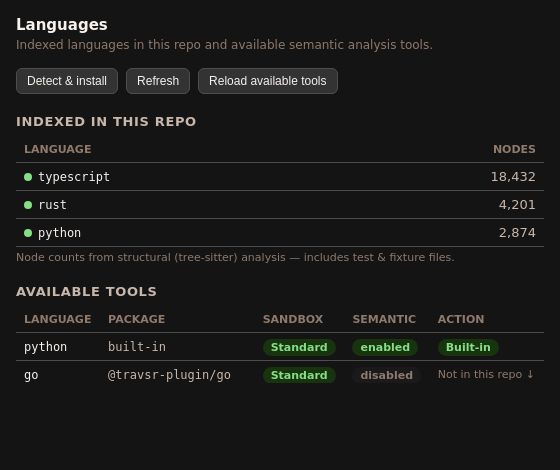
Toolbar
| Button | Action |
|---|---|
| Detect & install | Runs travsr lang detect and shows the list of languages found in the current repo, then offers to install any missing language tools |
| Refresh | Re-reads the current install state from disk |
| Reload available tools | Fetches the latest tool registry from the cloud (updates available versions) |
Indexed in this repo
The top section lists every language that Tree-sitter found files for in the current workspace, with the node count from the last index run. A green dot indicates the language is actively indexed.
Available tools
The lower table lists all installable language tools, with four columns:
| Column | Description |
|---|---|
| Language | Language name |
| Package | built-in for Rust / TypeScript / JavaScript / Python; @travsr-plugin/<lang> for external tools |
| Sandbox | Standard (no network access) or Elevated (downloads build deps, requires approval) |
| Semantic | enabled when the tool is installed and registered; disabled otherwise |
| Action | Built-in badge, Install button, or ▶ Grant access for elevated languages |
Standard vs Elevated
- Standard (Go, Ruby, PHP, C++, C): click Install and the tool downloads in the background.
- Elevated (Java, Kotlin, C#, Scala): clicking ▶ Grant access opens a form asking for an approver's GitHub handle, a justification, and the permitted network hosts. This approval is recorded in
.travsr/lang.tomlbefore the install proceeds.
CLI equivalent
travsr lang list       # table view
travsr lang detect     # detect + prompt to install
travsr lang install go # install a specific language
See travsr lang for the full CLI reference.