Execution Path
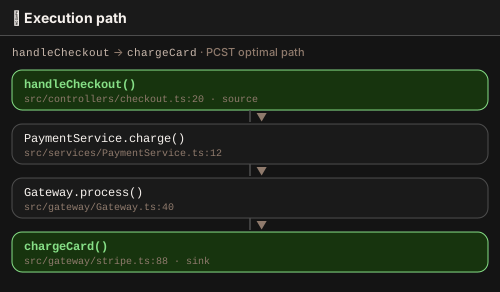
The Execution Path panel traces the shortest connected path between two symbols in the graph using the Prize-Collecting Steiner Tree (PCST) algorithm. Open it with Travsr: Show Execution Path from the command palette or the Travsr Graph view title bar.
Usage
- Place your cursor on a symbol to pre-seed it as the source.
- Run Travsr: Show Execution Path from the command palette.
- The panel prompts for a sink symbol (the destination).
- Travsr computes the PCST path and renders it in the graph panel.
What the path shows
The rendered path includes every intermediate node required to connect source to sink (call edges, import edges, and type references), forming the minimal subgraph that explains how the two symbols are related.
Backed by get_execution_path
The panel calls the get_execution_path MCP tool. Results are rendered in the visual graph panel (Cytoscape.js).
Command
Travsr: Show Execution Path
Available from the ⋯ overflow menu in the Travsr activity bar.