Repo Files Panel
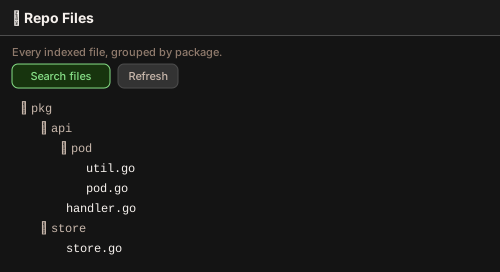
The Repo Files view is the second tree view in the Travsr sidebar. It shows every file Travsr has indexed for the current repository, grouped into a package and directory hierarchy.
The tree
Files are organized top-down:
pkg/                      top-level package
  api/                    sub-directory
    pod/                  sub-sub-directory
      util.go             file
Click any file to open its dependency graph (the same view as Travsr: Open File Graph).
Only indexed files appear. A file that Travsr has not parsed (an unsupported language, or a
path excluded by .travsrignore) is not listed.
Title-bar actions
| Command | Action |
|---|---|
Travsr: Search Files | Open a fuzzy QuickPick over every indexed file and jump straight to one |
Travsr: Refresh Repo Files | Reload the tree after a large reindex |
How it loads
The tree fetches files package by package: one MCP call loads all files under a top-level package, and expanding sub-directories is pure in-memory grouping with no further calls. This keeps the tree responsive even for packages with thousands of files.