Context Explorer
The Context Explorer surfaces the get_context retrieval pipeline as a full panel, so you
can see exactly what Travsr would hand an AI agent for a symbol or question, and why each
piece was chosen.
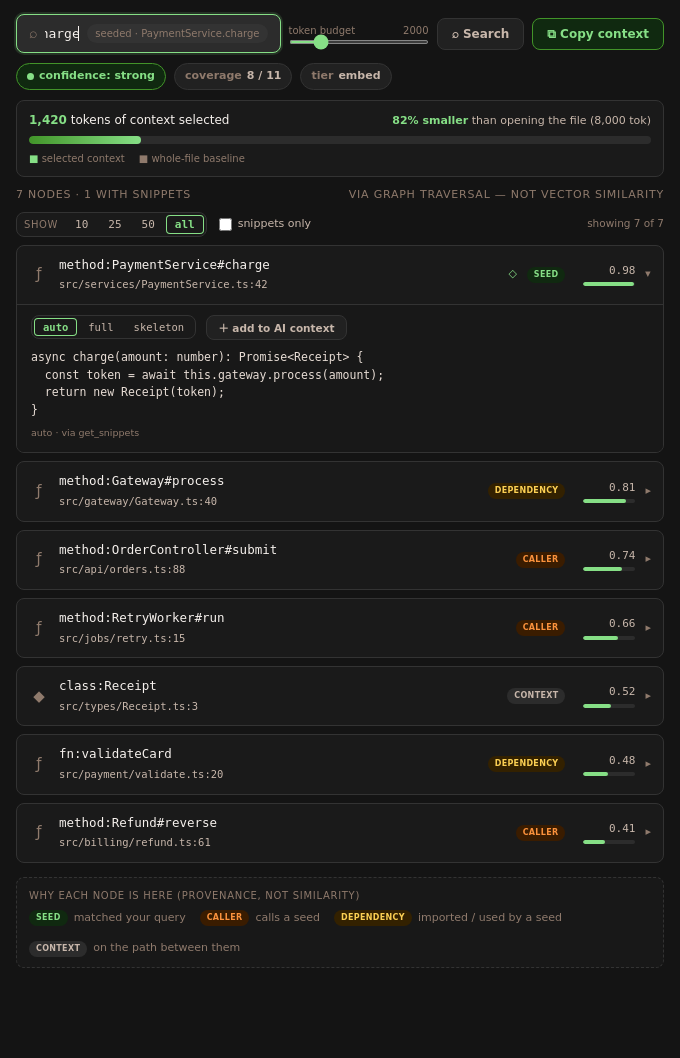
Open it with Travsr: Open Context Explorer (Cmd+Shift+K / Ctrl+Shift+K), from the Travsr
Graph view title bar, or from the editor context menu. When you open it on a symbol, the query
box is pre-seeded with that symbol (the seeded badge shows what it used).
The query bar
- Query: a symbol (
PaymentService.charge) or a natural-language question. Press Enter or click Search. - Token budget: a slider from 500 to 8000 (default 2000) that caps how much context the
pipeline returns. It maps to the
token_budgetargument ofget_context. - Copy context: copies the returned context to the clipboard. If you have pinned any node definitions (see below), they are appended so the bodies travel with the context.
Signals
Three pills summarize the result:
- confidence:
strong,moderate,partial, ornone- how well the query anchored to the graph. - coverage: how many of the candidate nodes were anchored, for example
8 / 11. - tier:
embedwhen an embedding backend contributed semantic seeds, orlexicalfor keyword-plus-graph only.
Token-saved bar
Shows how many tokens the selected context uses versus opening the whole file, for example "1,420 tokens of context selected - 82% smaller than opening the file". The baseline comes from the file the query was seeded on.
Result nodes
Each row is one node in the returned context:
- a kind icon (function, class, interface, and so on),
- the symbol and its
file:line(click the location to jump to it), - a provenance badge (see the legend below),
- a relevance score with a small bar.
Click a row to expand its snippet. Inside, a mode selector switches the snippet between auto, full (complete definition), and skeleton (AST summary), and add to AI context pins that definition so it is included when you copy.
Above the rows, a filter bar lets you show the top 10 / 25 / 50 / all nodes, or toggle snippets only.
Provenance, not similarity
The legend at the bottom explains why each node is present. Nodes come from graph traversal, not vector ranking:
| Badge | Meaning |
|---|---|
seed | matched your query |
caller | calls a seed |
dependency | imported or used by a seed |
context | on the path between them |
When there is no confident answer
If the query does not anchor cleanly, the panel is honest about it rather than guessing:
- a weak-match banner appears above loosely related structural neighbours, or
- for a true miss, an abstain screen ("No confident match") explains that Travsr declined rather than return a plausible-looking but unrelated set.
Some results also include degradation notes with a suggested travsr command you can run
to improve retrieval (for example, installing an embedding backend).
Token budget setting
The Copy Graph Context for Chat editor action uses travsr.contextTokenBudget (default
2000). See Settings.
Related
- The Copy Graph Context for Chat editor action runs the same pipeline without opening the panel.
- The underlying tool is documented at
get_context.