Hover Cards
Hovering over any symbol in a Travsr-indexed file shows an inline card with its callers and blast radius, pulled live from the graph, not from static analysis.
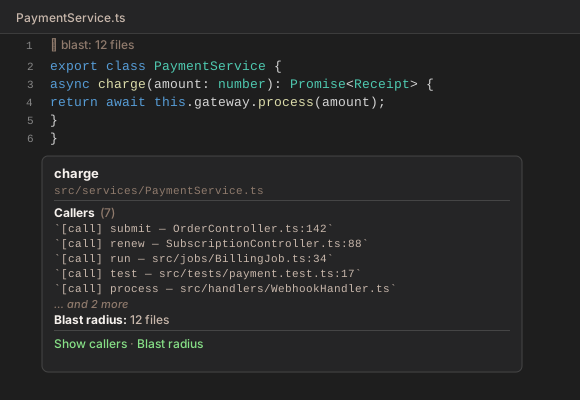
Card contents
**charge**

`src/services/PaymentService.ts`

---

**Callers** (7)

- `[call] fn:submit, src/controllers/OrderController.ts:42`
- `[call] fn:renew, src/controllers/SubscriptionController.ts:88`
- `[call] fn:run, src/jobs/BillingJob.ts:17`
- `[call] fn:test, test/payment.test.ts:9`
- `[call] fn:process, src/webhooks/WebhookHandler.ts:61`

… and 2 more

**Blast radius:** 12 files

---

[Show callers] · [Blast radius]
- Up to 5 callers are shown inline. If there are more, a
… and N moreline appears. - Caller lines use the format
`[call] <caller>, <path>:<line>`, taken fromget_callers. Structural edges show[structural], and a trailing~marks a caller matched by name rather than resolved by type. - Show callers opens the full Callers panel.
- Blast radius opens the Blast Radius panel for the file. Blast radius is per file, so every symbol in a file shows the same count.
- No card appears when a symbol has no callers and its file has no blast radius.
- Results are cached per file and symbol, and cleared on file save and whenever the graph changes.
Supported file types
Hover cards appear in files whose VS Code language is TypeScript, TypeScript React, JavaScript, JavaScript React, Rust, Python, Go, Java, Kotlin, Ruby, PHP, Scala, C++, C, C#, Swift, or Dart.