Code Lens
Travsr adds a blast radius code lens above every function, method, and class definition. The lens shows the number of files that would be affected if that symbol's signature changed.
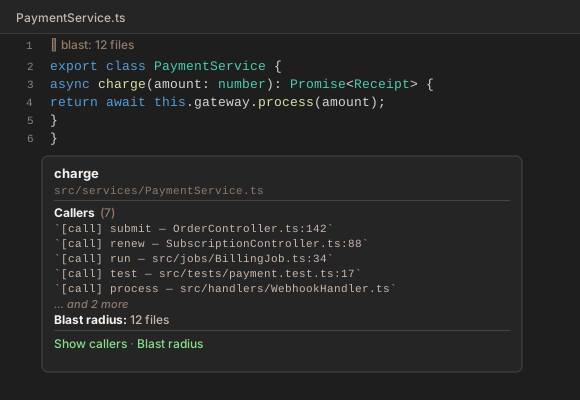
Lens format
🩻 blast: 12 files
async charge(amount: number): Promise<Receipt> {
🩻 blast:is the prefix (always present)- The count is the number of files in the blast radius
- Counts above 99 display as
99+
Supported file types
Code lenses appear in .ts, .tsx, .rs, .py, and .go files.
Clicking the lens
Clicking 🩻 blast: N files opens the Blast Radius panel, which lists every affected file with the dependency path that creates the coupling.
Command
You can also trigger the panel from the command palette:
Travsr: Show Blast Radius
This uses the symbol under the cursor (or prompts you to type one).