travsr lang
Install and manage per-language semantic analysis tools: plugins that add call edges, type resolution, and cross-module references on top of the always-on Tree-sitter structural parsing.
How language analysis works
Language tool tiers
Subcommands
| Subcommand | Description |
|---|---|
travsr lang list | Show every supported language and whether full analysis is available. Aliased as travsr lang status |
travsr lang detect | Scan this repo, detect its languages, and set up full analysis for them |
travsr lang install <lang> | Download the analyzer and turn on full analysis for the language |
travsr lang add <lang> | Older name for install; forwards to it |
travsr lang remove <lang> | Turn off full analysis for a language |
travsr lang allow-unsandboxed <lang> | Windows only: permit an analyzer that cannot run inside the isolation layer to run with your own privileges |
travsr lang list
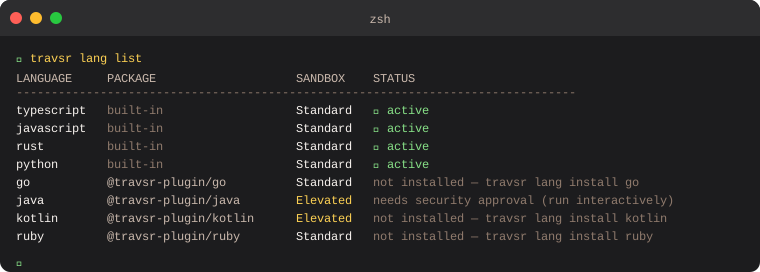
travsr lang list [--json]
Prints a table of every language, whether its analyzer is available on this machine, and whether full analysis is actually on for the repository you are standing in:
LANGUAGE     STATUS          THIS REPO
--------------------------------------------------------------
typescript   active          always on
javascript   active          always on
python       active          always on
rust         partial         needs analyzer
go           active          on
ruby         not installed   not enabled
java         not installed   not enabled
The two columns answer different questions, which is why both are there.
STATUS is about this machine: is the analyzer present at all. THIS REPO
is about the repository in front of you: is full analysis turned on for it. A
language can be installed machine-wide and still be off here, and Rust can be
authorised here while its analyzer is missing, which is the partial /
needs analyzer row above. The remedy for that row is
travsr lang install rust, not a per-repo step.
Earlier versions printed PACKAGE and SANDBOX columns. Both are gone: the npm package names no longer install anything, and the sandbox tier was an internal detail that did not tell you whether the language worked.
travsr lang detect
travsr lang detect
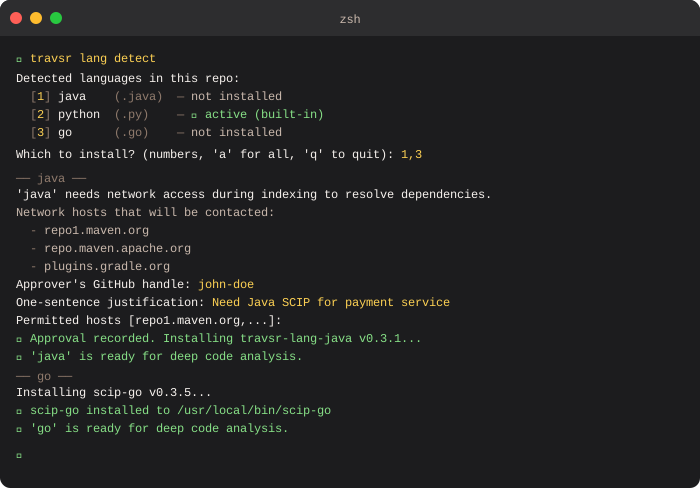
Scans the current repository for recognised file extensions and prints a numbered list of detected languages with their install status. Then prompts which ones to install:
Detected languages in this repo:
  [1] java    (.java)  -  not installed
  [2] python  (.py)    -  ✓ active (built-in)
  [3] go      (.go)    -  not installed

Which to install? (numbers separated by commas, 'a' for all, 'q' to quit):
travsr lang install
travsr lang install <language> [--reinstall] [--no-interactive] [--yes]
                              [--skip-wrapper] [--corpus <id>]
Downloads the language's analyzer into ~/.travsr/bin/ and turns on full
analysis for it.
travsr lang install go
# Installing scip-go...
# ✓ scip-go installed to ~/.travsr/bin/scip-go
Running it inside a repository is itself the consent signal for that repository,
so it also turns the language on here. There is no separate per-repo step and no
--corpus flag to remember.
Java, Kotlin, Scala, and C# reach the network while indexing to resolve build
dependencies. Their elevated access is granted automatically for local use, so
no approval step is required. Earlier versions asked for an approver's
GitHub handle, a justification, and a host allowlist, and travsr lang approve
recorded that non-interactively. Both are gone. The runtime isolation policy is
unchanged; only the human approval moment was removed.
Flags
| Flag | Description |
|---|---|
--reinstall | Re-download and overwrite the analyzer even if it is already installed |
--no-interactive | Skip all interactive prompts, for CI and scripting |
--yes | Auto-confirm the analyzer download |
--skip-wrapper | Only turn the language on in config; do not download its analyzer |
--corpus <id> | Advanced: turn on full analysis for a specific repository identity instead of the current one |
travsr lang detect
travsr lang detect [--yes]
Scans the repository, works out which languages it contains, and sets up full
analysis for them. Without --yes it prompts per language, so it needs a
terminal. Pass --yes in scripts and from the editor extension, where there is
none.
travsr lang remove
travsr lang remove <language>
Turns off full analysis for a language. The repository falls back to the Tree-sitter structural graph for it.
travsr lang allow-unsandboxed
travsr lang allow-unsandboxed <language> [--granted-by <who>] [--yes]
travsr lang allow-unsandboxed <language> --revoke
Windows only. Java (Gradle) and Scala (sbt) fork worker processes that cannot run inside the Windows isolation layer, so on Windows they are skipped rather than run. This records a one-time permission to run that analyzer with your own privileges instead.
The permission is per language and machine-local, never stored in the repo, and
the reindex on commit honours it with no extra flag. It requires an interactive
confirmation or --yes; it will not grant silently when there is neither. The
unsandboxed child starts from a cleared environment with an OS-essentials
allowlist, so tokens such as GITHUB_TOKEN, AWS_*, SSH_*, and NPM_TOKEN
never reach Gradle or sbt.
macOS and Linux never need this.
VS Code
The Languages panel in the VS Code sidebar shows the same information with one-click Install buttons for standard languages and a Grant access disclosure for elevated ones. See Languages Panel.
Sidecar versions
travsr lang list ends with the shared sidecars: block, reporting the installed version of each external analyzer and whether it meets the version Travsr requires.
sidecars:
  scip-clang      0.4.0  ok
A tool below its required version is refused at spawn rather than left to fail deeper, and the line names the reinstall command that fixes it. See travsr status for the full set of states.
C and C++ need a compile database
scip-clang cannot analyze a translation unit it does not know the compile flags for, so C and C++ semantic indexing requires a compile_commands.json at the repo root. Generate one with bear -- make, or with CMake's CMAKE_EXPORT_COMPILE_COMMANDS.
Worth knowing, because it looks like Travsr failing when it is not: a compile database missing system include paths produces partial output. scip-clang indexes what it can and stays quiet about the rest, so a file that includes a standard header may come back with fewer references than it actually has. If semantic results look thin for C or C++, check that the compile database is the one your build system generated rather than a hand-written stub.